Sunday, 28 June 2026

Setting VendInvoiceInfoTable default values for custom fields - D365 FO

 When creating a vendor invoice and you are trying to populate custom fields on table VendInvoiceInfoTable you may find that the following will only work if you are creating a blank invoice and not executing it from the invoice create button on a purchase order

[DataEventHandler(tableStr(VendInvoiceInfoTable), DataEventType::InitializingRecord)] 

public static void VendInvoiceInfoTable_onInitializingRecord(Common sender, DataEventArgs e) 

    VendInvoiceInfoTable vendInvoiceInfoTable = sender as VendInvoiceInfoTable; 

    vendInvoiceInfoTable.CustomField   VendParameters::find().DefaultCustomField; 

 }


This is due to the class PurchFormletterParmDataInvoice.createInvoiceHeaderFromTempTable()
which called .skipEvents(true), skipDataMethods(true), .skipDatabaseLog(true) and calls a query::insert_recordset() because of this none of the default events will get triggered.

In order to properly populate customfields on a blank vendor invoice or creating once from a purchase order the following will need to be done via extensions and CoC.


1.    Add custom fields to VendInvoiceInfoTable

2.    Add custom fields to VendInvoiceInfoTableTmp (name and types need to match what was created on VendInvoiceInfoTable)

1.    We have to add it to this table because on PurchFormLetterParmDataInvoice.insertParmTable() it calls a buf2buf command which loops through the field list.

3.    Create extension class of table VendInvoiceInfoTable and apply a CoC of defaultRow method which will populate the value onto both the regular and tmp instance of VendInvoiceInfoTable however it will not save to the database unless the remaining steps are completed

/// <summary>

/// Default values for a vendor invoice header from a purchase order

/// </summary>

[ExtensionOf(tableStr(VendInvoiceInfoTable))]

final class InvoiceModsVendInvoiceInfoTable_Extension

{

    /// <summary>

    /// COC table method defaultRow which resets default valies

    /// </summary>

    /// <param name = "_purchTable">PurchTable</param>

    /// <param name = "_ledgerJournalTrans">LedgerJournalTrans</param>

    /// <param name = "_resetFieldState">Reset field state</param>

    public void defaultRow(PurchTable _purchTable, LedgerJournalTrans _ledgerJournalTrans, boolean _resetFieldState)

    {

        CustomEDTType defaultCustomField;


 next defaultRow(_purchTable,_ledgerJournalTrans,_resetFieldState);


        //find the default custom field from vend parms

 defaultCustomField = VendParameters::find().DefaultCustomField;


 //save the default invoice type to the header which will get copied to    VendInvoiceInfoTableTmp and then back to the main table due to PurchFormLetterParmDataInvoice.createInvoiceHeaderFromTempTable

 this.CustomField = defaultCustomField;


    }


}

4.    Create extension class of PurchFormLletterParmDataInvoice and apply a CoC to buildCreateInvoiceHeaderFromTempTableFieldQuery and buildCreateInvoiceHeaderFromTempTableFieldMap because the method PurchFormletterParmDataInvoice.createInvoiceHeaderFromTempTable() creates a dynamic map of the fields to copy from the temp table into the main table 

[ExtensionOf(classStr(PurchFormletterParmDataInvoice))]

final class InvoiceModsPurchFormletterParmDataInvoice_Extension

{

    /// <summary>

    /// COC method that adds our custom field to the Field Query selection  from the temp table

    /// </summary>

    /// <param name = "_qbdsVendInvoiceInfoTableTmp">VendInvoiceInfoTableTmp</param>

    protected void buildCreateInvoiceHeaderFromTempTableFieldQuery(QueryBuildDataSource _qbdsVendInvoiceInfoTableTmp)

    {

        next buildCreateInvoiceHeaderFromTempTableFieldQuery(_qbdsVendInvoiceInfoTableTmp);


        //add custom selection field

 _qbdsVendInvoiceInfoTableTmp.addSelectionField(fieldNum(VendInvoiceInfoTableTmp, CustomField));

    }


    /// <summary>

    /// COC method thats adds our custom field to the dynamic field map against the main table. Which will get copied     from the selection query

    /// </summary>

    /// <param name = "_qbdsVendInvoiceInfoTableTmp">VendInvoiceInfoTableTmp</param>

    /// <returns>Modified dynamic map to insert into the db</returns>

    protected Map buildCreateInvoiceHeaderFromTempTableFieldMap(QueryBuildDataSource _qbdsVendInvoiceInfoTableTmp)

    {

        var targetToSourceMap = next buildCreateInvoiceHeaderFromTempTableFieldMap(_qbdsVendInvoiceInfoTableTmp);


        targetToSourceMap.insert(fieldStr(VendInvoiceInfoTable, CustomField), [_qbdsVendInvoiceInfoTableTmp.uniqueId(), fieldStr(VendInvoiceInfoTableTmp, CustomField)]);


 return targetToSourceMap;

     }


}

By applying our populate method to the defaultRow() method this will also trigger the value to populated on a blank vendor invoice once a vendor account is selected.


Monday, 25 May 2026

Display Method Data Not Showing in Query-Based SSRS Reports in D365 FO

 While working on a Query-Based SSRS Report in Dynamics 365 Finance & Operations, I faced an issue where a display method added through a table extension was not showing data in the SSRS report design, even after adding it to the dataset.

Issue

  • Extended a table and added a display method.

  • Added the display method in the SSRS report dataset.

  • Field appeared in the dataset/design, but data was not displayed in the report.

Resolution

To resolve the issue:

  1. Created a new View using the same table.

  2. Moved the display method from the table extension to the View.

  3. Joined this View with the existing SSRS report View/Query.

  4. Built and synchronized the project.

  5. Refreshed the SSRS report dataset by using the Query.

  6. Added the View display method field into the report design.

Result

The data started displaying correctly in the SSRS report.

Key Takeaway

In D365 FO, display methods from table extensions may not work properly in Query-Based SSRS reports. Using a View and exposing the display method through the View can be a reliable workaround.

Check Mandatory Product Dimensions in d365 Fo using X++

 public void checkMandatoryProductDimensions(ItemId _itemId)

{

    InventTable                   inventTable = InventTable::find(_itemId);

    EcoResProductDimensionGroup   ecoResProductDimGroup;

    EcoResProductDimensionGroupSetup  dimGroupSetup;


    if (inventTable)

    {

        // Get the Product Dimension Group linked to the Item

        select firstonly ecoResProductDimGroup

            where ecoResProductDimGroup.RecId == inventTable.ProductDimensionGroup;


        if (ecoResProductDimGroup)

        {

            // Join the setup table to see which dimensions are active/mandatory

            while select dimGroupSetup

                where dimGroupSetup.ProductDimensionGroup == ecoResProductDimGroup.RecId

            {

                if (dimGroupSetup.IsActive)

                {

                    Info(strFmt("Dimension: %1 | Is Mandatory: %2", 

                        dimGroupSetup.DimensionAttribute, 

                        dimGroupSetup.IsMandatory ? "Yes" : "No"));

                }

            }

        }

        else

        {

            Warning("No Product Dimension Group assigned to this item.");

        }

    }

}


Tuesday, 10 March 2026

Azure Data Engineer stack


A very common Azure Data Engineer stack is:

  • Azure Data Factory

  • Azure Databricks

  • Azure Data Lake Storage

  • Azure Synapse Analytics

  • Microsoft Power BI

  • SQL

  • Python

  • Git


Monday, 6 October 2025

Creating new D365FO Business Event

 The name should include the noun or phrase that corresponds with theevent, followed by the BusinessEvent suffix.

New business event for Customers.

Main contract class:

1
2
3
4
5
6
7
8
9
10
11
12
13
14
15
16
17
18
19
20
21
22
23
24
25
26
27
28
29
30
31
32
33
34
35
36
37
38
39
40
41
42
43
44
45
46
47
48
49
50
51
52
53
54
55
56
/// <summary>
/// This is a BusinessEventContract class for Customer
/// </summary>
[DataContract]
class VKCustTableChangedBusinessEventContract extends BusinessEventsContract
{
    SysAppCRUDOperation                action;
    CustAccount                        custAccount;
    DataAreaId                        dataAreaId;
 
    private void initialize(CustTable _custTable, SysAppCRUDOperation _action)
    {
        custAccount    = _custTable.AccountNum;
        dataAreaId    = _custTable.DataAreaId;
        action        = _action;
    }
 
    /// <summary>
    /// Create new VKCustTableChangedBusinessEventContract from CustTable and action
    /// </summary>
    /// <param name = "_custTable">CustTable table</param>
    /// <param name = "_action">Action</param>
    /// <returns>a new VKCustTableChangedBusinessEventContract</returns>
    public static VKCustTableChangedBusinessEventContract newFromCustTable(CustTable _custTable, SysAppCRUDOperation _action)
    {
        VKCustTableChangedBusinessEventContract    contract    = new VKCustTableChangedBusinessEventContract();
        contract.initialize(_custTable, _action);
        return contract;
    }
 
    protected void new()
    {
    }
 
    [DataMember('CustAccount'), BusinessEventsDatamember("CustAccount")]
    public CustAccount parmCustAccount(CustAccount _custAccount = custAccount)
    {
        custAccount = _custAccount;
        return custAccount;
    }
 
    [DataMember('Action'), BusinessEventsDatamember("Action")]
    public SysAppCRUDOperation parmAction(SysAppCRUDOperation _action = action)
    {
        action = _action;
        return action;
    }
 
    [DataMember('DataAreaId'), BusinessEventsDatamember("DataAreaId")]
    public DataAreaId parmDataAreaId(DataAreaId _dataAreaId = dataAreaId)
    {
        dataAreaId = _dataAreaId;
        return dataAreaId;
    }
 
}

Business event class:

1
2
3
4
5
6
7
8
9
10
11
12
13
14
15
16
17
18
19
20
21
22
23
24
25
26
27
28
29
30
31
32
33
34
35
36
37
38
39
40
41
42
43
44
45
46
47
48
49
/// <summary>
/// This is a BusinessEvent class for Customer
/// </summary>
[BusinessEvents(classStr(VKCustTableChangedBusinessEventContract),
    "Customers CU",
    "Event for create, update",
    ModuleAxapta::General)]
class VKCustTableChangedBusinessEvent extends BusinessEventsBase
{
    private CustTable custTable;
    SysAppCRUDOperation action;
 
    /// <summary>
    /// Create new VKCustTableChangedBusinessEvent from CustTable and action
    /// </summary>
    /// <param name = "_custTable">CustTable table</param>
    /// <param name = "_action">Action</param>
    /// <returns>a new VKCustTableChangedBusinessEvent</returns>
    public static VKCustTableChangedBusinessEvent newFromCustTable(CustTable _custTable, SysAppCRUDOperation _action)
    {
        VKCustTableChangedBusinessEvent businessEvent = new VKCustTableChangedBusinessEvent();
        businessEvent.parmAction(_action);
        businessEvent.parmCustTable(_custTable);
        return businessEvent;
    }
 
    private CustTable parmCustTable(CustTable _custTable = custTable)
    {
        custTable = _custTable;
        return custTable;
    }
 
    private SysAppCRUDOperation parmAction(SysAppCRUDOperation _action = action)
    {
        action = _action;
        return action;
    }
 
    protected void new()
    {
    }
 
    [Wrappable(true), Replaceable(true)]
    public BusinessEventsContract buildContract()
    {
        return VKCustTableChangedBusinessEventContract::newFromCustTable(custTable, action);
    }
 
}

Extension to CustTable table to trigger insert/update events:

1
2
3
4
5
6
7
8
9
10
11
12
13
14
15
16
17
18
19
20
21
22
23
24
25
26
27
28
29
30
31
32
33
34
35
36
37
38
39
40
41
42
43
44
/// <summary>
/// Extension class for Custtable table
/// </summary>
[ExtensionOf(tableStr(CustTable))]
final class VKCustTable_Extension
{
    public void insert(DirPartyType _partyType, Name _name,boolean _updateCRM)
    {
        next insert(_partyType, _name, _updateCRM);
 
        if (BusinessEventsConfigurationReader::isBusinessEventEnabled(classStr(VKCustTableChangedBusinessEvent)) && !CustTable::vkSkipByUserFilter())
        {
            VKCustTableChangedBusinessEvent::newFromCustTable(this, SysAppCRUDOperation::Create).send();
        }
    }
 
    public void update(boolean _updateSmmBusRelTable, boolean _updateParty)
    {
        next update(_updateSmmBusRelTable, _updateParty);
 
        if (BusinessEventsConfigurationReader::isBusinessEventEnabled(classStr(VKCustTableChangedBusinessEvent)) && !CustTable::vkSkipByUserFilter())
        {
            VKCustTableChangedBusinessEvent::newFromCustTable(this, SysAppCRUDOperation::Update).send();
        }
    }
 
    /// <summary>
    /// Whether to skip sending business event or not
    /// </summary>
    /// <returns>true to skip sending BE</returns>
    public static boolean vkSkipByUserFilter()
    {
        boolean ret = false;
 
        // Use there real user id, which will be used for integration to avoid triggering update business event when external system updates the entity
        if ('Admin' == curUserId())
        {
            ret = true;
        }
 
        return ret;
    }
 
}

Configuration:

- Build
- System administration / Setup / Business events / Business events catalogue
- Manage / Rebuild business event catalogue
You should be able to find your Business Event in the list in specified category (General from example above)

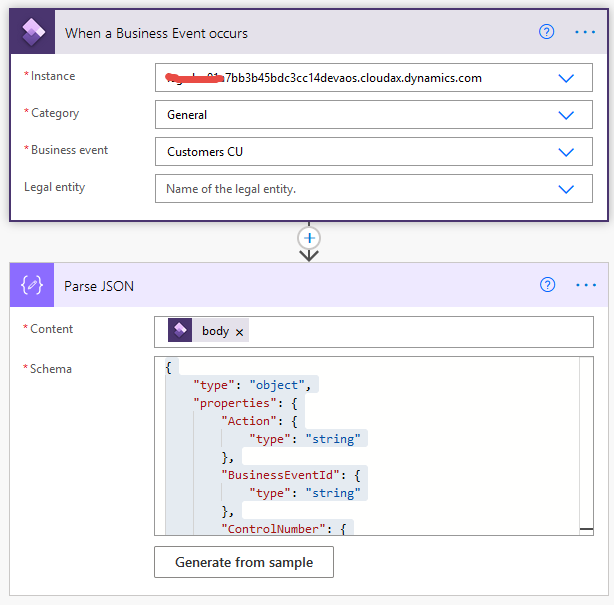
Power Automate:

- Create new
- Automated cloud flow
- Set Flow name and click Skip button
- In Search input type "Dynamics"
- Select Fin & Ops Apps
- Select Whan a Business Event occurs
- Select three dots in the right top corner and in My connecions section select "Add new connection"
- Select Connect with service principal
- Fill in Connection name, Client ID, Client Secret and Tenant (which is Licensed to in D365FO About)
- Select three dots in the right top cornerand choose corrrect connection
- Select right Instance
- Select General as Category
- Select Customer CU as Business event

- Add new step
- Type "Parse JSON" in search input
- Select "Parse JSON"
- Set body of previouse step as a Content
- Click Generate from sample button and pase there Schema from Business event (System administration / Setup / Business events / Business events catalogue / find the record / click Download schema button)

- Add additional steps with required actions

Creating BE in russian: https://www.youtube.com/watch?v=my155UP0Wmg

Troubleshooting:

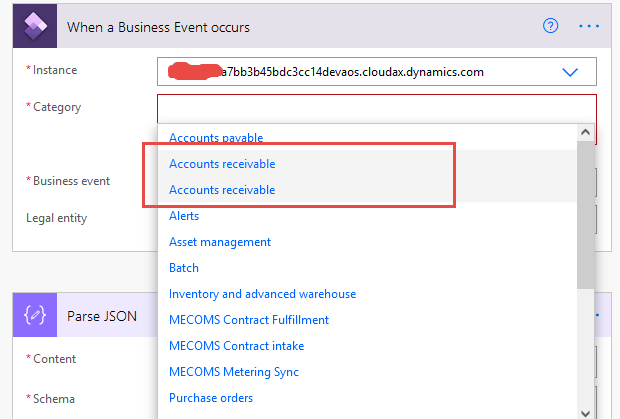
There is a bug in Power Automate that it is not possible to select your business event if you place it in a category with existing standard business events, for example "Accounts Receivable". It shows duplicating record in the category dropdown and then there is no option to select your newly created business event:
Category dropdown:

Other endpoint tutorials for using business events:
https://learn.microsoft.com/en-us/training/modules/business-events-finance-operations/consume-business-events

Setting VendInvoiceInfoTable default values for custom fields - D365 FO

  When creating a vendor invoice and you are trying to populate custom fields on table VendInvoiceInfoTable you may find that the following ...